
From Countdown to Review: Designing the JLPT Sprint Desk Study Loop
A project note on turning JLPT exam prep into a lightweight study cockpit, where planning, daily logs, review analytics, and local-first storage create a faster feedback loop.
The hardest part of preparing for the JLPT is not simply asking whether I studied today. The harder question comes after the study session: where did the time go, did the weak areas actually receive attention, and as the exam gets closer, is today’s plan still the right plan?
JLPT Sprint Desk was built around that question. It is not just a todo list. It connects goal setting, generated plans, daily logs, review analytics, and backup export into one study loop, so exam prep can move from “trying hard by instinct” to “adjusting with evidence.”
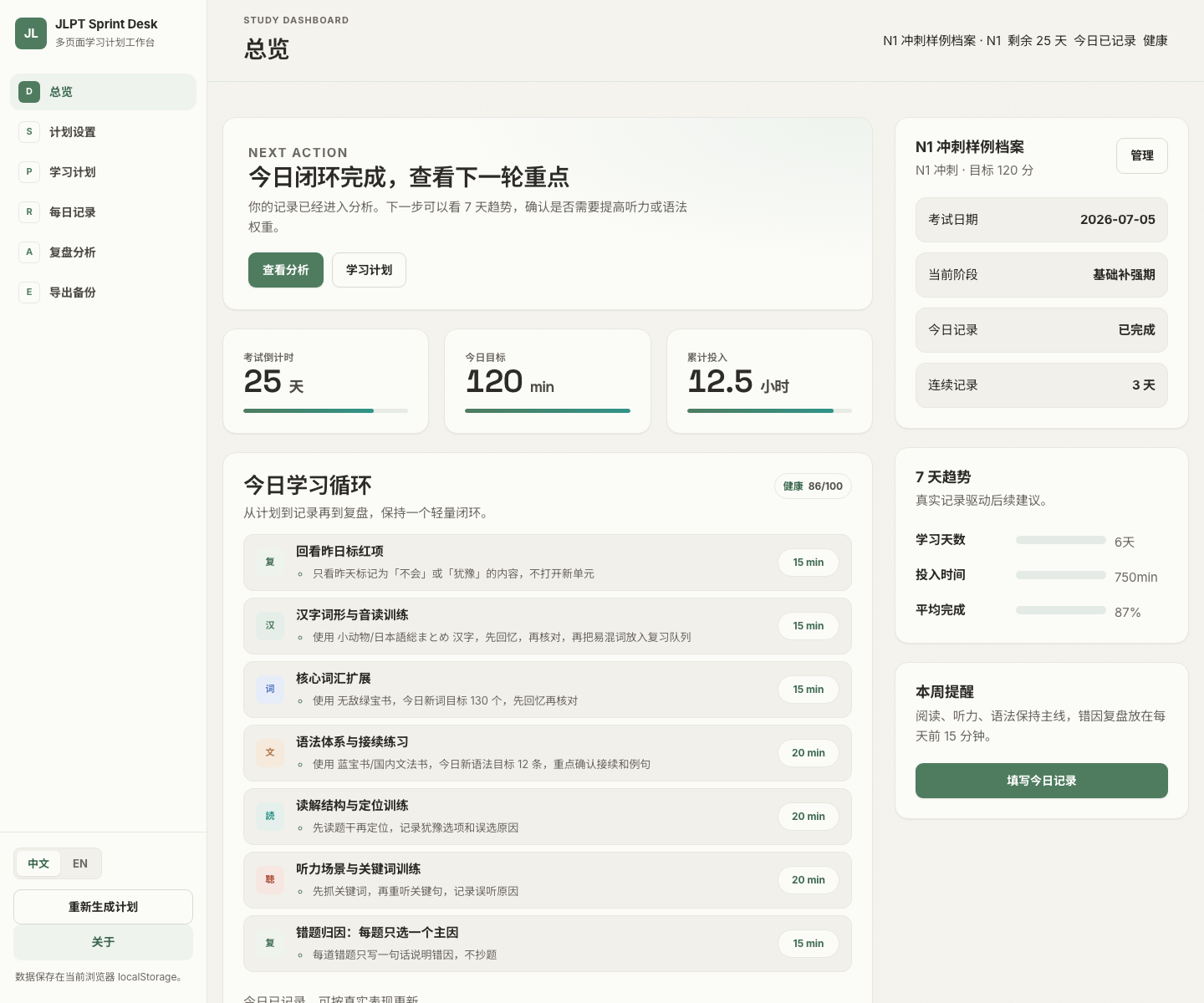
Seeing Today’s Next Step
The dashboard is not meant to show every possible feature. Its job is to answer three questions quickly:
- How many days are left before the exam?
- How much time should I study today?
- Which page should I open next?
In the sample profile, the N1 exam is 25 days away, today’s target is 120 minutes, and recent accumulated study time is 12.5 hours. The right sidebar shows a seven-day trend: 6 study days, 750 minutes logged, and 87% average completion. These numbers do not replace learning, but they make rhythm visible.
The “today’s study loop” section turns the plan into practical tasks: review yesterday, kanji and vocabulary, grammar, reading, listening, and error-cause notes. Each task has a time budget, so the plan does not collapse into the vague instruction to “study more.”
A Plan Is a Budget, Not Just a Calendar
The plan page turns level, exam date, daily availability, weak modules, and material preferences into a visible 14-day plan that can still cover the full sprint cycle.
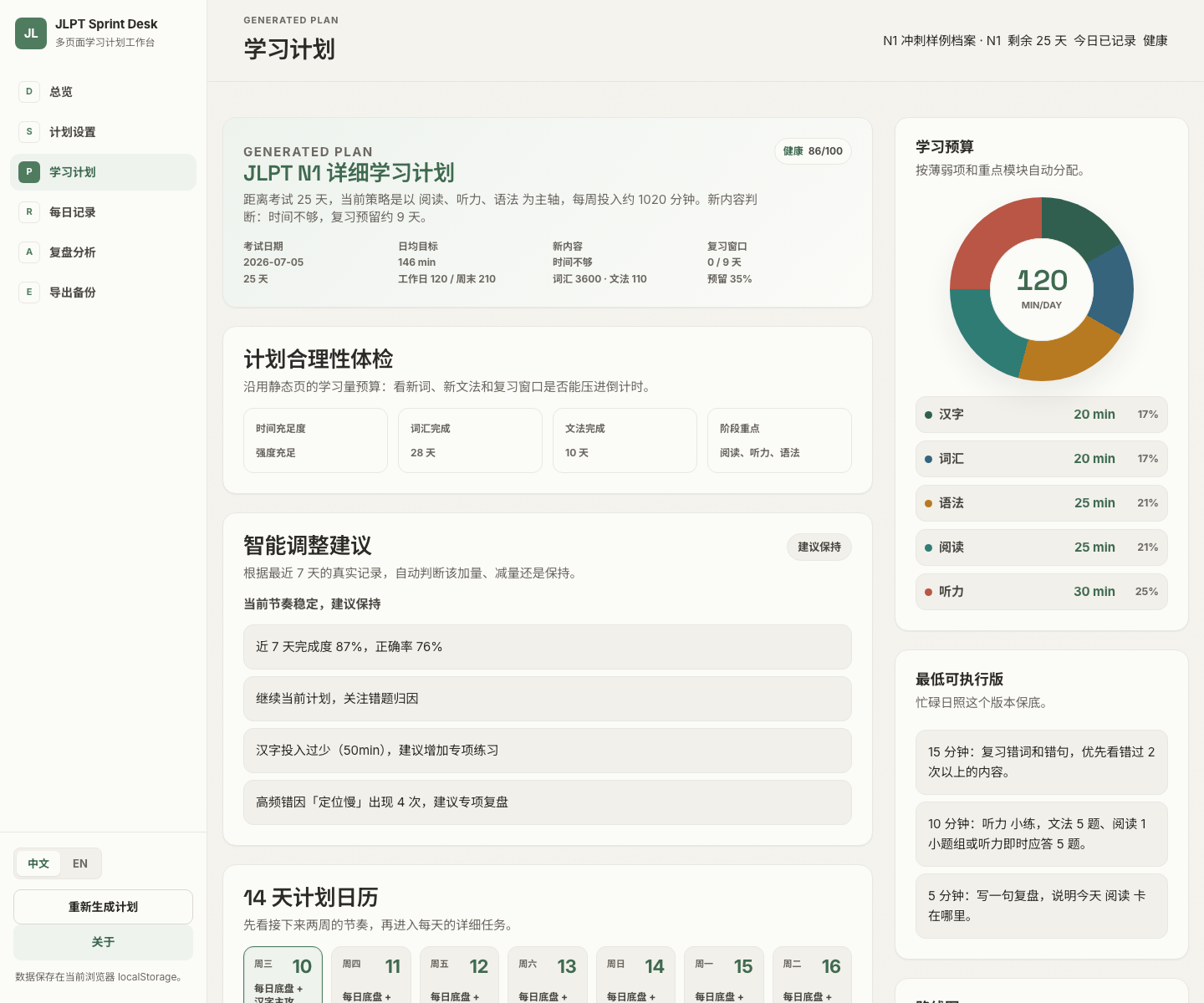
The most useful part of this page is the feasibility check. In the sample profile, the system looks at 25 days remaining, 120 weekday minutes, 210 weekend minutes, and weak reading, listening, and grammar areas. From that it evaluates:
- whether the daily average target is sufficient
- how many days vocabulary and grammar still need
- whether the review window is being squeezed
- whether module-level time allocation is skewed
The budget chart on the right makes the allocation easy to scan: listening, reading, and grammar take larger shares, which matches the weak areas in this profile. The page also includes a minimum executable version for busy or low-energy days, so one bad day does not break the whole plan.
Daily Logs Should Be Fast and Useful Later
The daily log page is designed to be completed in about two minutes. It tracks only the fields that matter: time per module, completion, accuracy, error causes, overtime reasons, and tomorrow’s first step.
Those logs are not there to make check-ins look nice. They feed the analysis page. For example, two sessions can both take 120 minutes, but if 80 of those minutes were lost to slow reading-location work, the useful suggestion is not “try harder.” It is “reduce the reading task size and add timed location drills.”
Review Turns Effort Into Judgment
The review analysis page is the part that feels most like a cockpit. It starts with a conclusion, then backs it with charts.
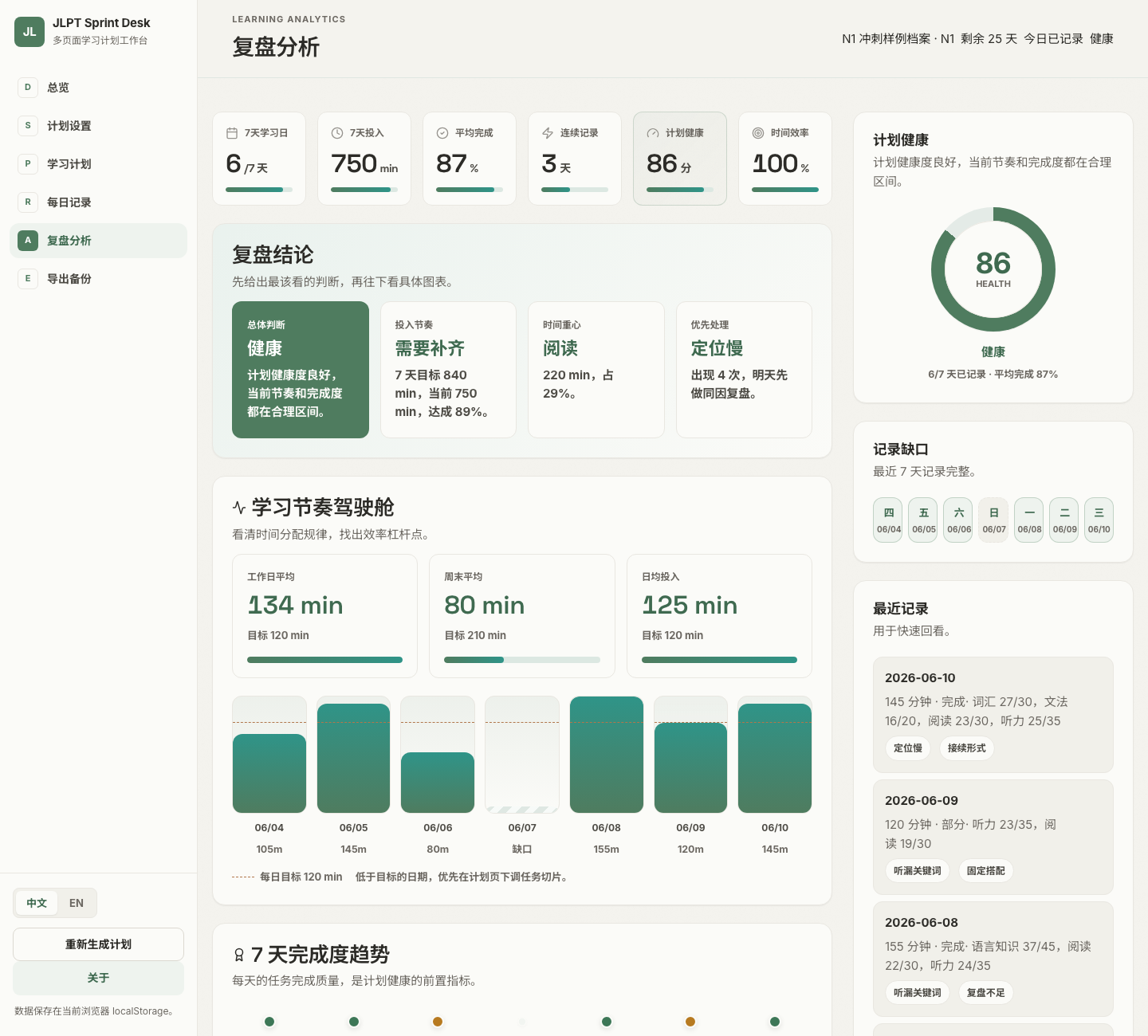
The sample data shows:
- 6 logged study days in the last 7 days, with 1 missing day
- 750 minutes logged against an 840-minute target
- 87% average completion and a plan health score of 86
- 134 minutes on average during weekdays, above the 120-minute target
- 80 minutes on average during the weekend, far below the 210-minute target
The conclusion is clear: weekdays are healthy, but weekends are not carrying the expected extra load. For real exam prep, that is much more useful than a vague feeling that things are “going okay.”
Finding the Modules That Actually Consume Time
The module-depth analysis groups recent logs across kanji, vocabulary, grammar, reading, and listening.
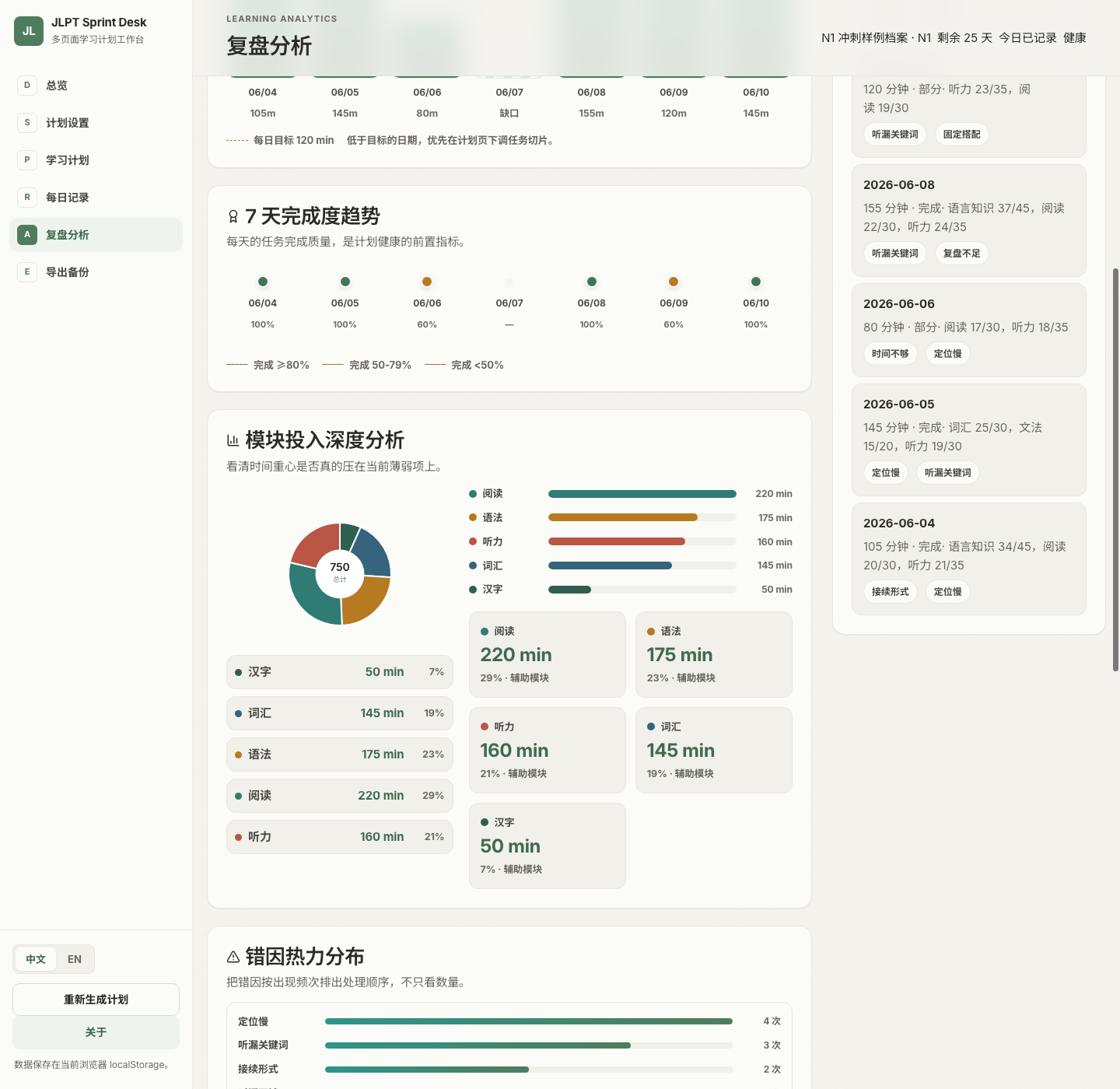
In the screenshot, reading accounts for 220 of the 750 minutes, the largest share. Grammar follows with 175 minutes, and listening with 160 minutes. That confirms time is going toward the weak areas, but it also reveals a potential future gap: kanji only received 50 minutes.
The error-cause heatmap pulls out why mistakes happened. In the sample, “slow location” appears 4 times, “missed listening keywords” appears 3 times, and “connection forms” appears 2 times. The next plan adjustment can therefore focus on the most frequent causes instead of relying on memory.
Keeping the Technology Light
The technical stack is intentionally restrained:
- React 19 + TypeScript + Vite
- React Router Hash Router for static deployment
- CSS variables instead of a UI framework
- custom SVG charts instead of a heavy charting library
- React Context + localStorage for default local persistence
- optional Supabase sync for cloud backup and cross-device use
I like this tradeoff. By default, data lives in the browser’s localStorage, so the user can start without creating an account. If cross-device sync becomes necessary, they can connect their own Supabase project. For a study tool, this local-first and cloud-optional model feels right.
The Real Problem Is Feedback Delay
During a JLPT sprint, late feedback is dangerous. It is easy to finish several practice sets before realizing listening was never repaired, or to notice one week before the exam that new content has pushed review out of the plan.
JLPT Sprint Desk tries to move feedback earlier: log today, adjust tomorrow; notice bias this week, correct it next week. It does not promise to pass the exam for you, but it can illuminate the blind spots in the process, making each study session easier to see, explain, and revise.
That is the part I value most: it does not make studying more complicated. It compresses a complicated preparation state into a few judgments that can actually be acted on.
Enjoy this article?
If you found it helpful, consider supporting my work.