
Turning Japanese Grammar Into Daily Review Cards: A JLPT Grammar Deck UI Note
How JLPT Grammar Deck turns N1-N5 grammar material into a study desk for browsing, saving, practicing, and reviewing grammar every day.
The hard part of learning Japanese grammar is often not a lack of material. It is that the material is scattered: one pattern in a textbook, another in notes, another in bookmarks. When it is finally time to review, the next question becomes surprisingly hard: what should I study today?
JLPT Grammar Deck is built around that problem. It turns N1 to N5 grammar into a study desk where patterns can be browsed, saved, practiced, reviewed, and tracked. The interface does not feel like a traditional question bank. It feels more like a stack of grammar cards, already grouped by level and ready to be flipped open.
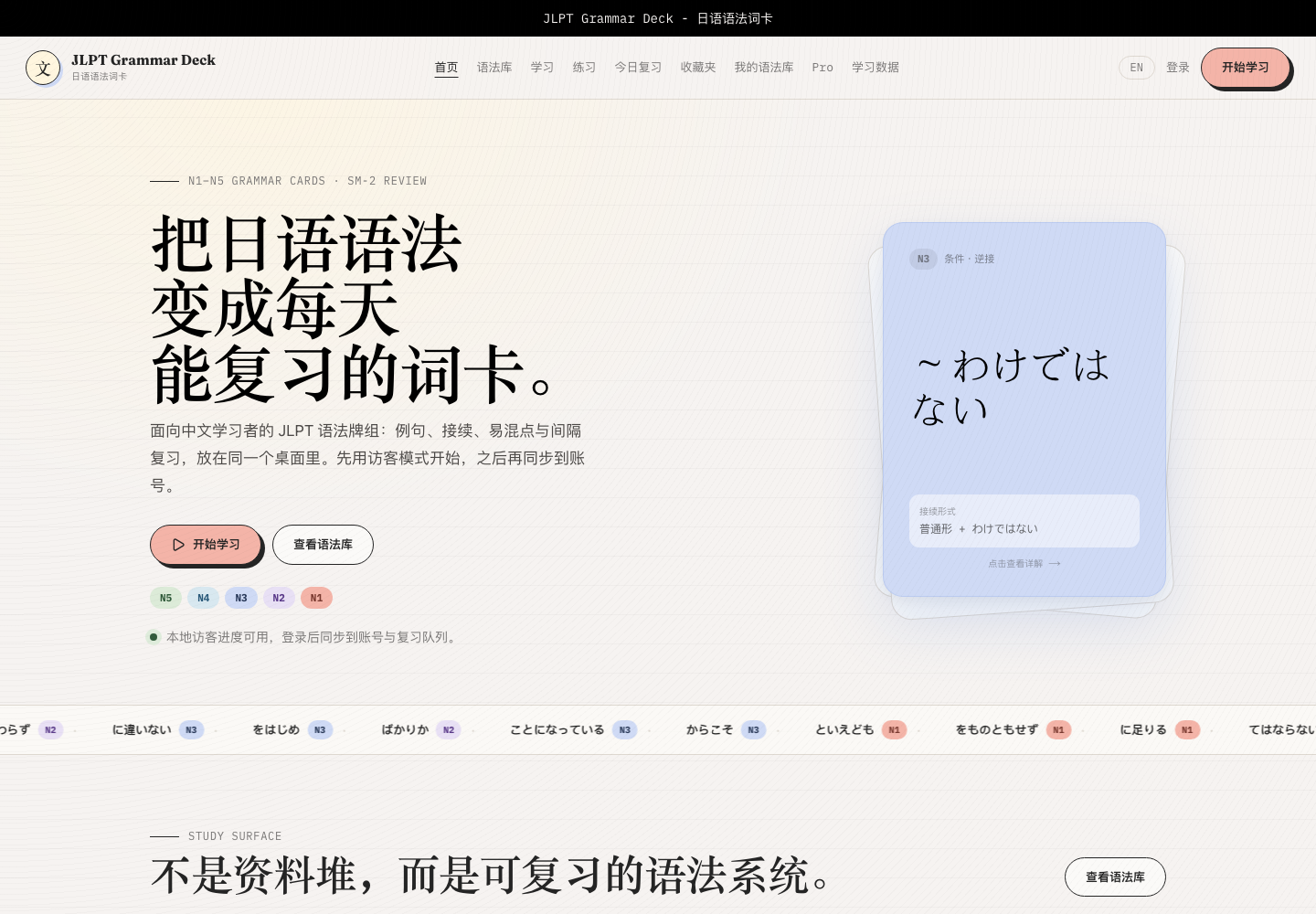
Home: Make the Next Step Obvious
The home page does not expose every feature at once. It starts with two clear choices: begin studying, or open the grammar library.
The central grammar card is the visual anchor of the product. The front shows the grammar pattern and connection hint; the back holds the meaning, examples, common mistakes, and feedback actions. At a glance, the user can tell that this is not only a reference tool. It turns grammar into units that can be recalled, rated, and scheduled.
Below that, the page introduces the larger system: grammar library, spaced review, similar-pattern comparison, study progress, and a personal grammar library. The rhythm feels calm: first make it easy to start, then explain why the system is worth returning to.
Grammar Library: From Reference List to Grammar Map
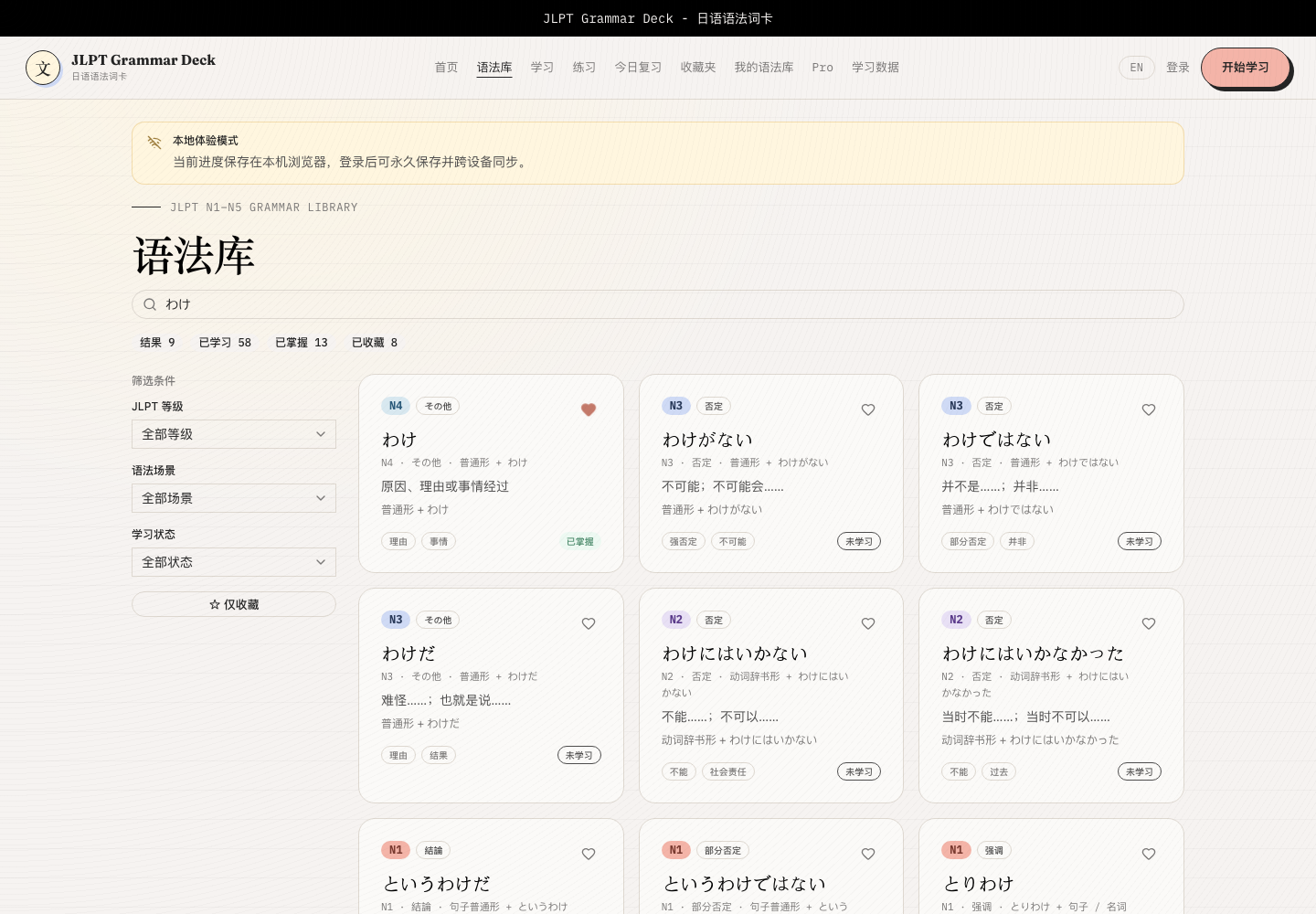
The grammar library is the part that most resembles a reference center, but it avoids becoming a dense list.
Each grammar item is presented as a card. JLPT level, grammar category, title, meaning, connection form, tags, learning status, and favorite action all stay in the same visual unit. Searching for わけ makes it easy to see how the same surface form shifts across levels and meanings: わけ, わけがない, わけではない, and related forms.
The filter sidebar is practical too. The user can narrow results by JLPT level, grammar scene, learning state, and favorites. For exam prep, that is closer to the real workflow than keyword search alone. Review often starts not with “find this exact item,” but with “show me the N2 negative expressions I have not mastered yet.”
Detail Pages: Explain One Pattern Completely
On a grammar detail page, information is split into clear sections: meaning, connection, detailed explanation, usage scenes, example sentences, common mistakes, memory hints, and similar patterns.
The right side holds the learning-state card: whether the item has been studied, mastery level, review count, last review, and next review. This matters because it puts “understanding a grammar point” and “remembering it over time” on the same page. After reading the explanation, the user can add it to the learning queue instead of letting it drift away.
Study: Anki-Inspired, But Closer to Grammar Learning
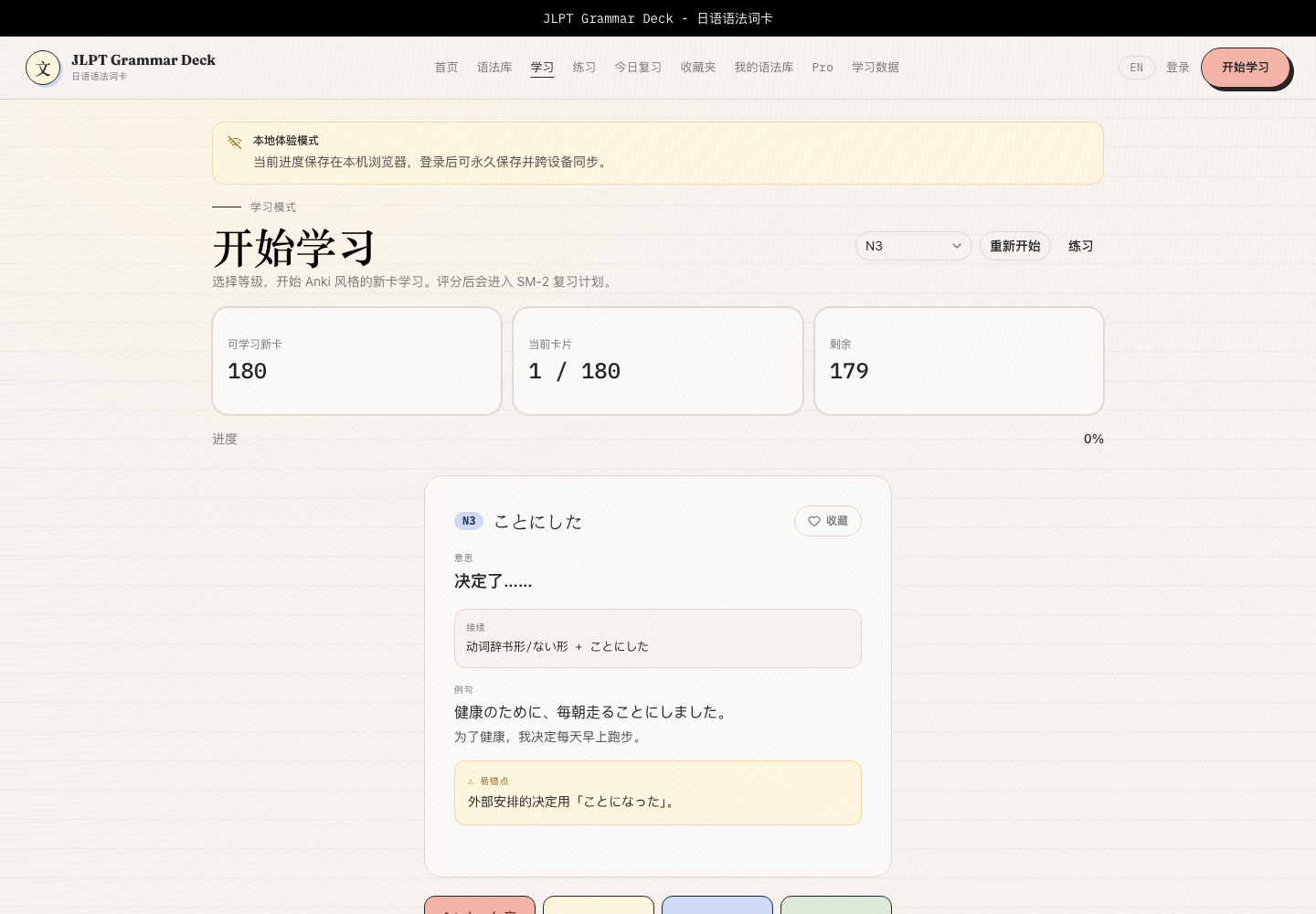
The study page is centered on one flippable grammar card.
The front asks the user to recall first: what does this pattern mean, how does it connect, and can I make a sentence with it? Only after flipping the card does the full explanation appear, including connection form, Japanese example, Chinese translation, and common mistake notes. That creates more useful memory pressure than showing the answer immediately.
The four feedback buttons map to a simple memory scale: forgot, blurry, remembered, and easy. The user does not need to schedule the next review manually. They rate their memory state, and the system moves the card into the right future review queue.
Today’s Review: Bring Old Cards Back
Learning new cards is only the first step. Review is what decides whether they stay.
The today’s review page shows grammar that has already been studied and is now due. Once the session starts, it uses the same flip-card and rating interaction, so the user does not have to learn a new mode. At the end, the page reports completion count and study streak, creating a small but useful feedback loop.
The benefit is that the user does not need to plan again every time they open the app. “What should I review today?” is already waiting in the queue.
Practice: From Recognition to Use
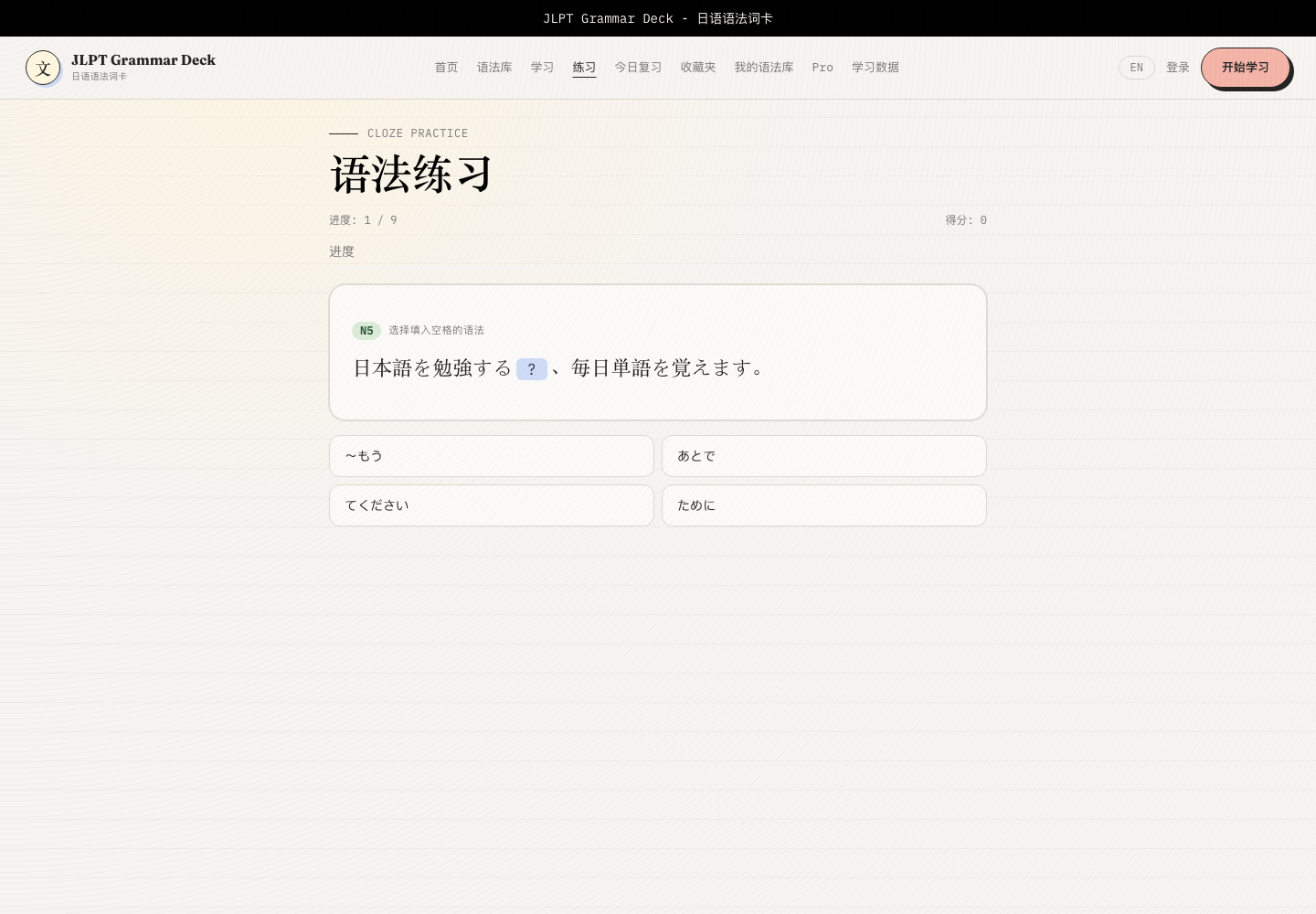
The practice page handles a different step: putting grammar back into sentences.
It generates cloze-style multiple-choice questions from example sentences, asking the user to choose which grammar option best fits the sentence. Questions can come from today’s practiced items, learned items, or the full grammar set, and can also be narrowed by JLPT level.
This makes the learning path more complete. The library is for looking things up, study cards are for memorizing, today’s review is for retention, and practice checks whether the pattern still makes sense inside a sentence.
Study Data: Progress Is More Than a Percentage
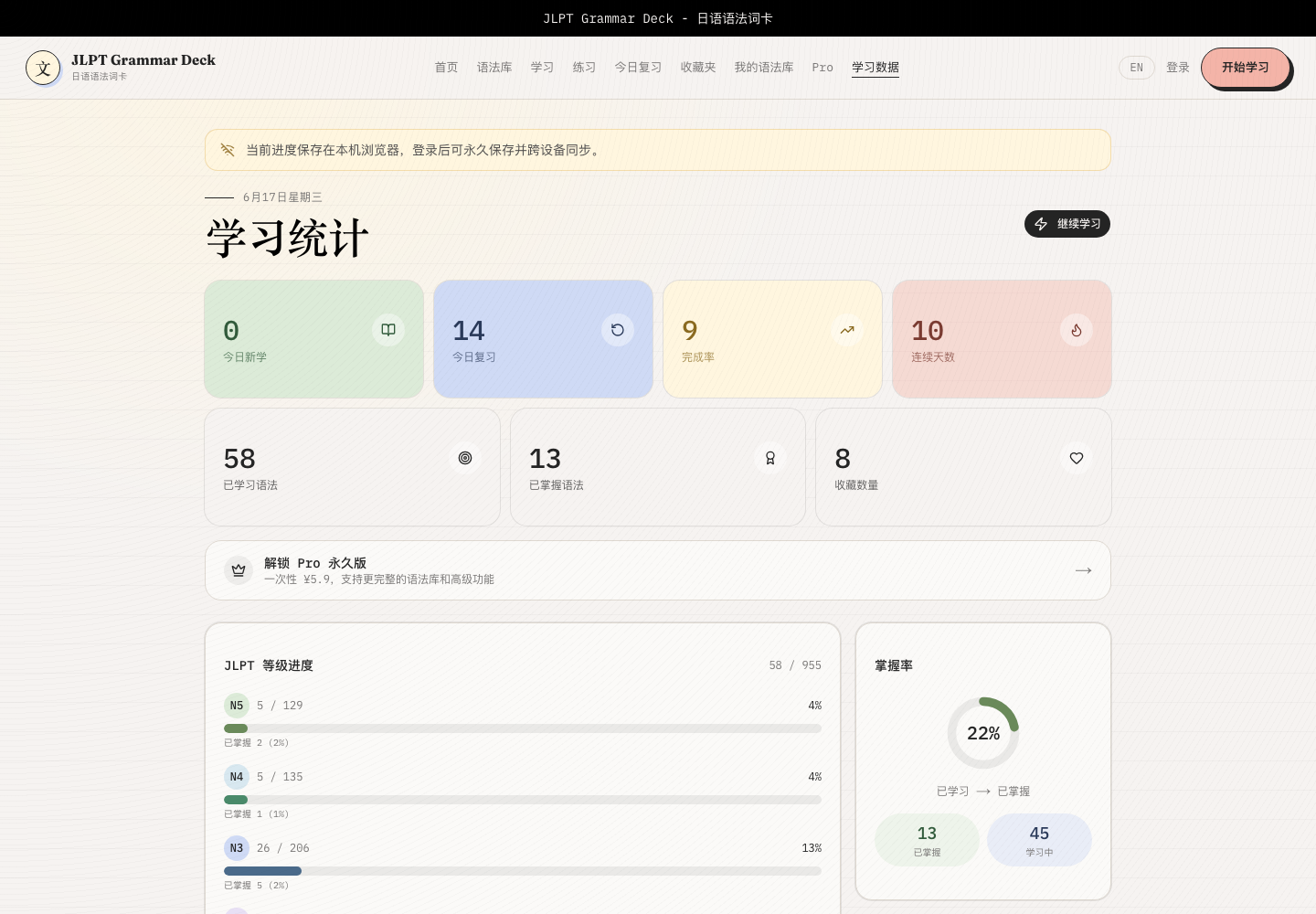
The study data page is restrained, but it carries a lot of useful information.
The top section shows daily metrics: new items, reviews, completion rate, and streak. Below that are learned grammar count, mastered grammar count, favorites, JLPT-level progress, mastery rate, rating distribution, and recent review history.
These numbers are not there to create pressure. They help the user decide the next move: add new cards, clear due reviews first, check whether one JLPT level is weak overall, or notice that certain patterns keep failing.
Favorites and Personal Grammar Library
Favorites are useful for exam-critical patterns, common mistakes, honorific expressions, or anything that deserves repeated attention. Saving a pattern does not interrupt the study flow, because it can be done directly from cards and detail pages.
The personal grammar library goes further. Users can add private grammar entries and hide default library items they do not want to see for now. For long-term learners, this matters because the grammar points that deserve repeated attention are not the same for everyone.
A Grammar Tool That Feels Like a Study Desk
The interface of JLPT Grammar Deck is not trying to impress through visual tricks. Its strength is that it breaks grammar learning into natural actions:
- search and filter in the grammar library when looking something up
- enter study cards by level when pushing forward systematically
- open today’s review when reinforcing old material
- use grammar practice when checking sentence-level recognition
- return to study data when deciding what to do next
The best part is that reference and review are no longer separated. Each grammar point is both a readable knowledge item and a card that can enter the study queue. Each rating is both immediate feedback and the basis for the next review time.
If you are preparing for the JLPT, or if scattered grammar notes have ever made review feel noisy, this kind of interface can make the rhythm much quieter. What to study today, what has not been mastered, and when to return to it all have a place to live.
Note: Screenshots in this post use local demo study data to show interface states and feature entry points.
Enjoy this article?
If you found it helpful, consider supporting my work.