
When I first built JLPT Grammar Deck, I wanted to solve a very specific problem. Japanese grammar resources are plentiful, but during exam preparation the harder questions are often: what should I study today, when should I review it again, and which items are still unstable?
I recently redesigned the project’s interface and product structure. The new version feels less like a flashcard demo and more like a study desk worth opening every day. It connects 955 grammar points across N1–N5, Anki-style cards, SM-2 spaced review, cloze practice, a personal grammar library, and learning analytics in one path.
Live app: jlpt-grammar-cards.com

A Home Page That Starts the Study Session
The most visible change is that the home page no longer opens with a grid of feature cards. It first explains the problem the product is meant to solve.
A reversible grammar card anchors the new hero, while “Start studying” and “View grammar library” are the clearest actions. Further down, the page introduces the 955-item library, SM-2 review, similar-grammar comparison, analytics, Guest mode, the personal library, and a complete five-step learning loop.
The visual language now resembles paper, notes, and a carefully arranged workbook: warm off-white surfaces, serif headings, small monospaced labels, thin borders, and restrained color blocks. It keeps attention on the Japanese content instead of making the app feel like an administrative dashboard.
955 Grammar Points That Can Be Managed, Not Just Stored
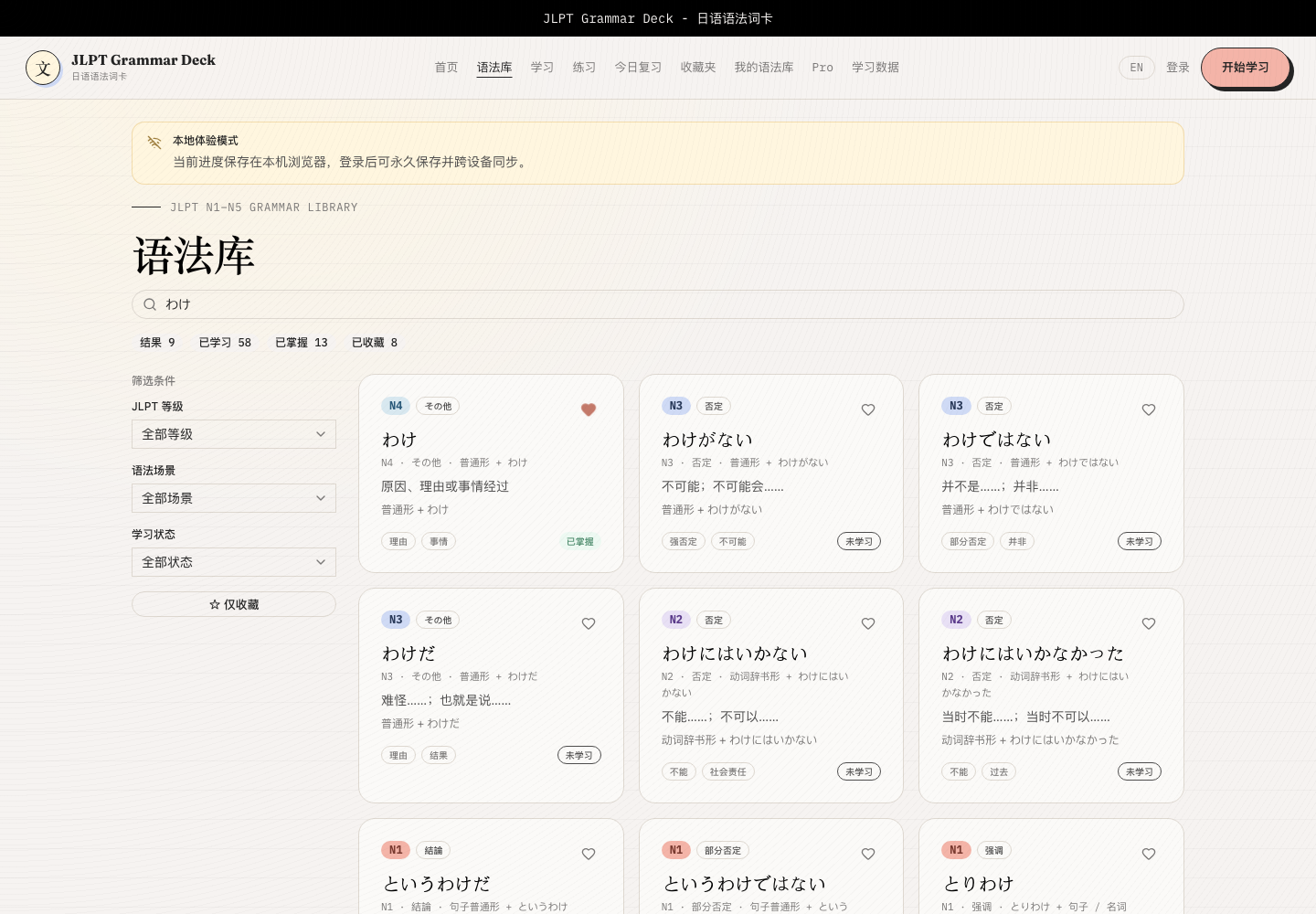
The current library contains 955 items: 129 at N5, 135 at N4, 206 at N3, 233 at N2, and 252 at N1.
An entry can include meaning, construction, examples, translations, common mistakes, memory hints, and similar grammar. Learners can search by keyword or combine filters for JLPT level, grammar context, study status, and favorites.
That distinction matters. A useful library does more than hold a large dataset: it brings similar expressions together and shows whether each item is unstudied, in progress, or mastered. Grammar detail pages are also server-rendered and supported by sitemap and robots metadata, making individual explanations more reliable to open, share, and discover.
Every Feature Is Free, and Guest Mode Still Comes First
The latest version removes the former Pro boundary. The full grammar library, study and review analytics, personal grammar entries, and cloze practice are available to everyone without a paywall or usage limit.
No account is required to start. Guest mode stores progress, favorites, SM-2 state, and review history in the current browser. When cross-device access or long-term sync becomes useful, the learner can sign in and merge that local progress into Supabase.
This remains an important product principle for me: let someone complete a real study session before asking them to create an account.
The former Pro page has become a “Features and roadmap” page. It separates shipped capabilities from planned work such as a mistake notebook, bulk import and export, better mobile study, and continued content editing. Voluntary support is available, but it never changes feature access.
A Card Shows Only What You Should Remember Now
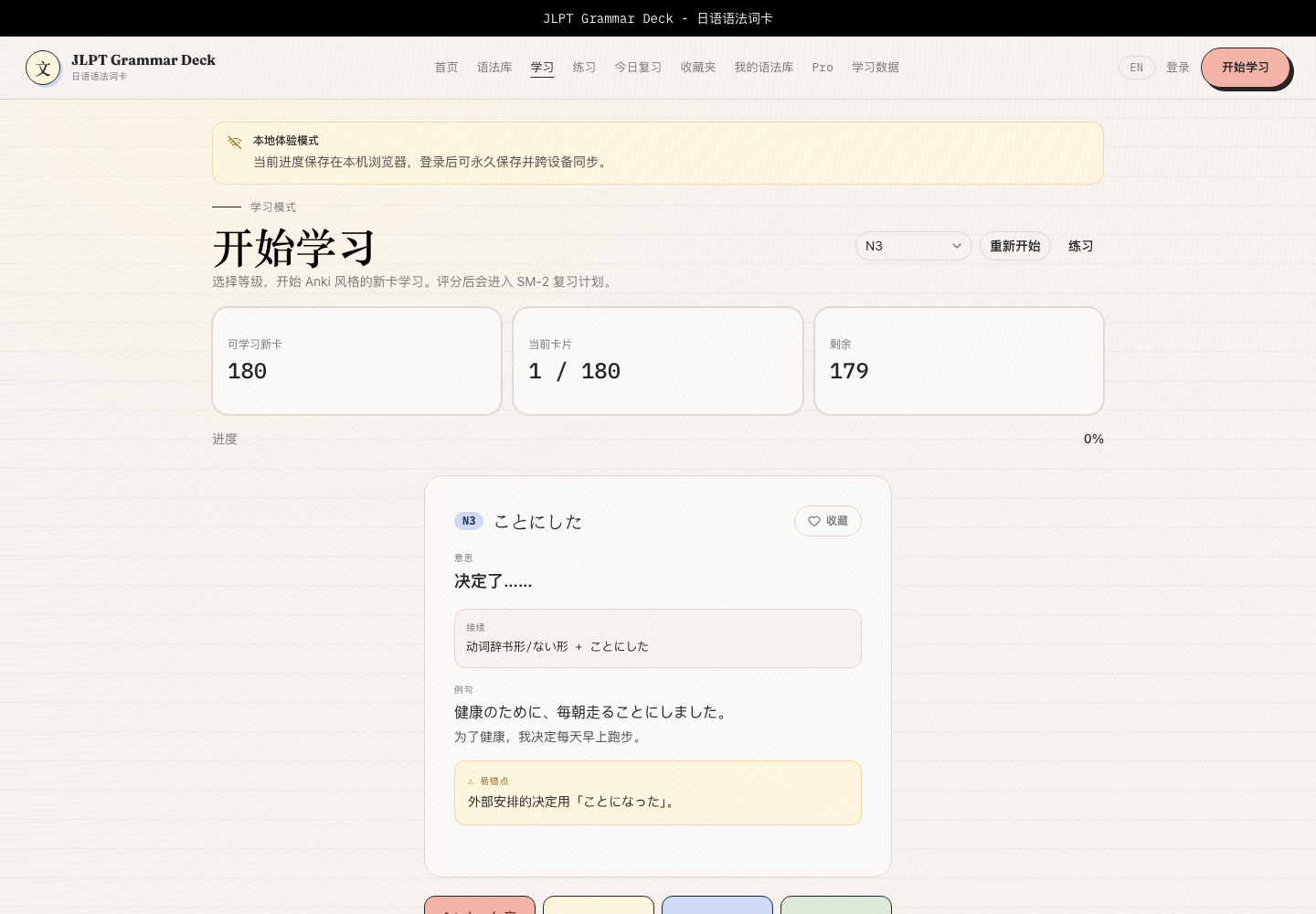
The study page keeps its Anki-style approach while focusing more tightly on the current card. The front shows the grammar, level, and only the hints needed for recall. Meaning, construction, examples, and pitfalls appear after “Show answer” is selected.
A recent update also isolates the hidden card face so unrevealed answer content cannot interfere with recall. The page surfaces the available count, current position, remaining cards, active level, restart action, and a visible shortcut into practice.
After revealing the card, learners rate it Again, Hard, Good, or Easy. SM-2 then updates mastery, interval, and the next due date. Rating advances immediately; the previous card is read-only, and submission locking prevents a rapid double-click from recording the same review twice.
Practice Is the Next Step, Not a Separate Product
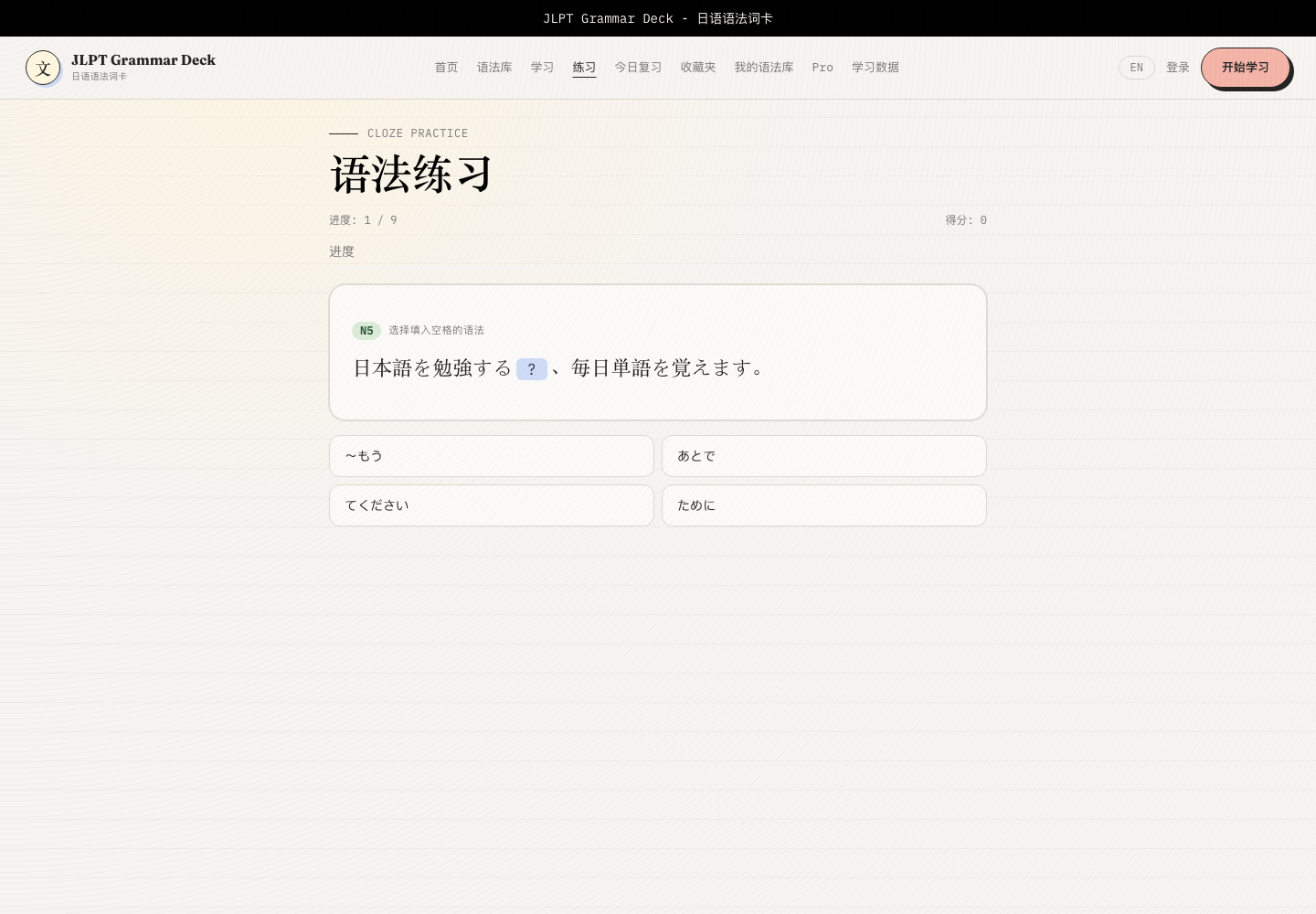
The practice page creates multiple-choice cloze questions from example sentences already in the library, so it does not require a separately maintained fixed quiz bank. Its three scopes are:
- Grammar practised today
- Previously studied grammar
- All grammar, optionally narrowed by JLPT level
After answering, the learner sees the correct answer, score, progress, and explanation. The redesign also places practice shortcuts at the top of both study and due-review pages, reducing the distance between seeing a card and testing that grammar inside a sentence.
This is one of the most practical parts of the new interface. It changes more than styling: it exposes the next useful action exactly where a learner is likely to need it.
Basic and Advanced Analytics Are Now One Dashboard
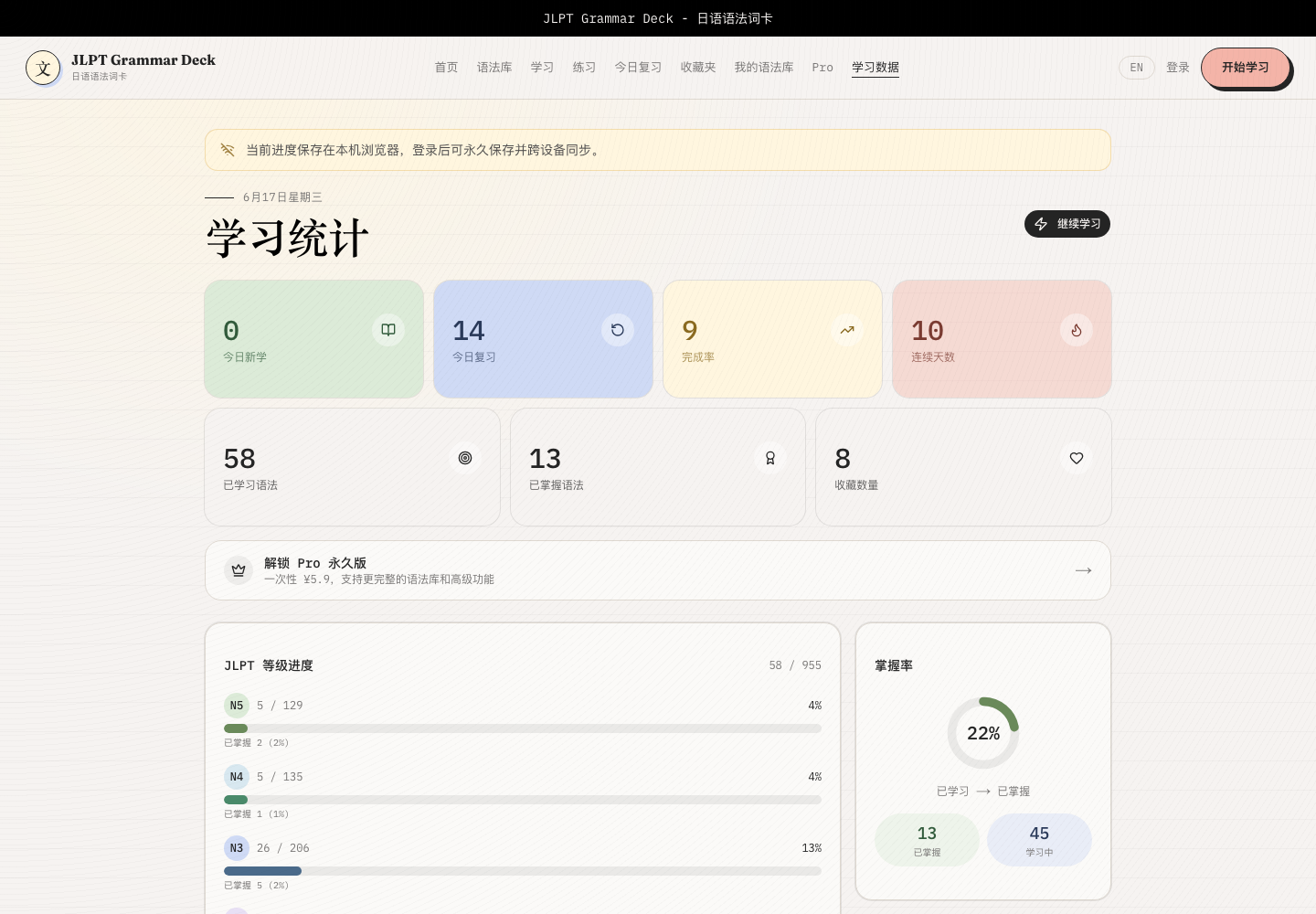
The dashboard now brings together:
- New items, due reviews, completion, and study streak
- Learned, mastered, and favorited counts
- N5–N1 progress and overall mastery
- Seven-day activity and four-rating distribution
- Recent review history
- Retention grouped by review interval
- Weak grammar repeatedly rated Again or Hard
Analysis that was previously separated into different tiers is now freely available. The dashboard is meant to answer more than “How many buttons did I press today?” It should reveal what deserves relearning first and whether memory survives as intervals grow.
Personal Grammar Joins the Same Learning System
Learners can favorite important default items, hide content they do not currently need, and add unlimited private grammar entries. Personal items are not isolated notes; they can join the same study, review, and analytics flow.
Signed-in data uses Supabase PostgreSQL, Auth, and Row Level Security. Guest progress stays in localStorage and is merged after sign-in. This keeps the first session frictionless without giving up durable account sync for long-term study.
What Changed Under the New Interface
The current stack includes:
- Next.js 16 App Router, React 19, and TypeScript
- Tailwind CSS 4 and a custom interface system
- Supabase PostgreSQL, Auth, and Row Level Security
- localStorage Guest progress with cloud merging after sign-in
- SM-2 scheduling, review history, and retention analysis
- Example-driven cloze generation
- Vitest coverage for data, algorithms, and services
- Vercel deployment
The update is not only visual. Grammar detail pages now use server rendering and runtime ISR, the site publishes sitemap and robots metadata, the deck is loaded lazily, and the dataset continues to receive audits, deduplication, and redirects for old IDs. For a content-heavy learning tool, stable delivery and correct identity matter as much as a polished screen.
A Study Desk Worth Reopening Tomorrow
JLPT Grammar Deck now forms a clearer loop: find an item in the library, recall it on a card, rate it into the SM-2 queue, test it in a cloze sentence, and return to the dashboard to choose the next priority.
After the redesign, I want the product to communicate more than “There are 955 grammar explanations here.” It should tell the learner, “You know what to do next.” For a study tool, that sense of direction is more valuable than the feature count itself.
This article reflects the project as of August 2026. Its publication date remains May 1, 2026; screenshots were captured in unsigned-in Guest mode.
Enjoy this article?
If you found it helpful, consider supporting my work.